Diagram Syntax
Crossflow’s JSON diagrams have a schema that’s meant to balance human and machine readability. The schema is freely available, enabling developers to validate diagrams and ensure correctness in their tools.
The schema is automatically generated from the Rust-native structs inside of crossflow. The library schemars is used for the generation. Whenever crossflow code is changed in a way that could affect the schema, the schema can be updated inside the crossflow repo by running
cargo run -F=diagram generate_schema
If the generated schema is ever out of date with the structs inside the library, an automated test in the crossflow repo will catch this if you run
cargo test -F=diagram
Diagram
The root of the crossflow diagram schema is the Diagram struct. Below is a minimal example of a diagram that works with the calculator demo:
{
  "$schema": "https://raw.githubusercontent.com/open-rmf/crossflow/refs/heads/main/diagram.schema.json",
  "version": "0.1.0",
  "description": "Basic workflow that multiplies the interger input by 3.",
  "input_examples": [
    {
      "description": "Multiply 123 by 3 to get 369",
      "value": "123"
    },
    {
      "description": "Multiply 456 by 3 to get 1368",
      "value": "456"
    }
  ],
  "start": "mul3",
  "ops": {
    "mul3": {
      "type": "node",
      "builder": "mul",
      "config": 3,
      "next": { "builtin": "terminate" }
    }
  }
}
Here’s a breakdown of the fields in the example:
"$schema"is an optional field that simply helps some JSON-related tools to validate the rest of the file. This is not a built-in part of the crossflow diagram schema, but may be helpful to include."version"prevents mistakes that may happen as the schema progresses over time."start"indicates which operation in the diagram to send the input of the workflow to. The operation named here can be thought of as the starting point of the workflow."ops"is a dictionary of the operations and buffers present in the workflow. The connections between these operations are specified inside the operation definitions.
Operations
Inside the "ops" field is a dictionary of the operations that exist in the workflow.
Each key is a unique identifier for an operation instance in the workflow.
The value of each dictionary entry is the definition of the operation instance.
The unique identifier (key) is used to refer to the operation instance in other parts of the diagram.
For example, "start": "mul3" above indicates that the workflow starts from the operation in "ops" whose key is "mul3".
Here is an example of chaining operations together:
{
  "version": "0.1.0",
  "start": "mul3",
  "ops": {
    "mul3": {
      "type": "node",
      "builder": "mul",
      "config": 3,
      "next": "minus_1"
    },
    "minus_1": {
      "type": "node",
      "builder": "sub",
      "config": 1,
      "next": { "builtin": "terminate" }
    }
  }
}
The workflow starts at "mul3" and then "mul3" has a "next" field that says to pass its output to "minus_1".
Inside "minus_1" the "next" field refers to { "builtin": "terminate" }.
When you see { "builtin": _ }, that’s a reference to a builtin target, explained below.
Builtin Targets
Builtin targets are operation targets that are always available to pass outputs to without being instantiated in an "ops" dictionary.
They are referred to with a JSON object syntax that looks like { "builtin": _ } where _ is one of the builtin targets:
"terminate": Use the output to terminate the current scope. The value passed into this operation will be the return value of the scope."dispose": Dispose of the output. This is used to explicitly indicate that you are okay with an output not being passed along to any operation—instead its messages will just be dropped after they are sent out. The diagram schema assumes that unconnected outputs are likely to be a mistake, similar to an unused variable in source code. The dispose operation essentially says that you are intentionally not using the output."cancel": Use the output to cancel the current scope. If the message can be converted to a string then its string representation will be included in the cancellation error message.
Instantiated Operations
The operations instantiated inside of "ops" are instantiated specifically for the diagram.
Each instance has its own configuration based on what type of operation it is.
The supported diagram operations are encompassed by the DiagramOperation enum.
Each variant of that enum represents a different type of operation.
The schema for an operation is internally tagged, meaning they all take on this form:
{
  "type": "_",
  ...
}
where "_" should be replaced by the operation variant name in snake-case lettering.
For example a DiagramOperation::ForkClone operation would contain
{
  "type": "fork_clone",
  ...
}
whereas a DiagramOperation::Node operation would contain
{
  "type": "node",
  ...
}
The rest of the fields in the operation are based on the specific schema of the operation type.
“fork_clone”
The schema of a "fork_clone" operation is given by ForkCloneSchema, which simply contains a next: Vec<NextOperation> that indicates which operations to pass clones of the input message to.
That might look something like
{
  "type": "fork_clone",
  "next": ["foo", "bar", "baz"]
}
“node”
On the other hand the schema of a "node" operation is given by NodeSchema.
This is a more complex operation schema that contains several significant fields:
"builder"is the unique name of a Node Builder that has been registered with your workflow executor. Node builders will be covered later in the Nodes page."config"is a configuration for this operation instance. The value associated with"config"has a dynamic schema determined by the"builder"that you chose. That schema can be looked up in the diagram element registry described in the next page."next"indicates where the final output message of the operation should be sent. This is a required field because we generally assume that the output of a node is valuable information that should be passed along. If you are running a node for its side-effects and don’t need to use its final output then you can set"next"to{ "builtin": "dispose" }."stream_out"is a dictionary that says what target each output stream of the node should be connected to. This field is optional—even if your node has streams, you don’t have to connect them anywhere. If you don’t need to connect any streams, you can leave this field out. If you only need to connect some streams, you can fill in this field and only include entries for the streams you care about.
A node instance might look like
{
  "type": "node",
  "builder": "chop_apple",
  "config": {
    "slice_count": 6
  },
  "next": "try_take_apple",
  "stream_out": {
    "slices": "apple_slice_buffer"
  }
}
Trace Settings
All operation types include TraceSettings fields which determine how the operation gets viewed in an editor or visualizer.
There are currently three trace settings fields:
display_textsays how the name of the operation should be portrayed when the operation is visualized. Unlike the operation’s key in the"ops"dictionary, this display text does not need to be unique across the operations.tracelets you toggle whether this specific operation will be traced. An operation whose trace setting is"on"will emit a signal whenever it produces a message. When set to"messages"the message data will be serialized and included in the trace signal each time. If you skip this field, the operation will follow the default trace setting at the diagram level.extensionsallows you to put thirdparty extension data into each operation. This can be used for adding editor-specific metadata such as the position where an operation should be rendered or how an operation should be displayed (e.g. color, icons, etc). The Diagram schema also has anextensionsfield for diagram-wide extensions.
These fields are flattened into the operation definition, so you would put them directly inside the operation definition, like this:
{
  "type": "node",
  "builder": "chop_apple",
  "config": {
    "slice_count": 6
  },
  "next": "try_take_apple",
  "stream_out": {
    "slices": "apple_slice_buffer"
  },
  "display_text": "Chop Apple",
  "trace": "messages"
}
Type Inference
You’ll notice that none of the schemas in a diagram specify any input or output message types. The workflow builder has the ability to infer what message types need to pass between operations. This is inferred from registered node and section builder information which have fixed message types.
Note
There are some niche cases where buffer message types can’t be automatically inferred. We might allow message types to be explicitly set for buffers. This is being tracked by #60.
Serialization / Deserialization
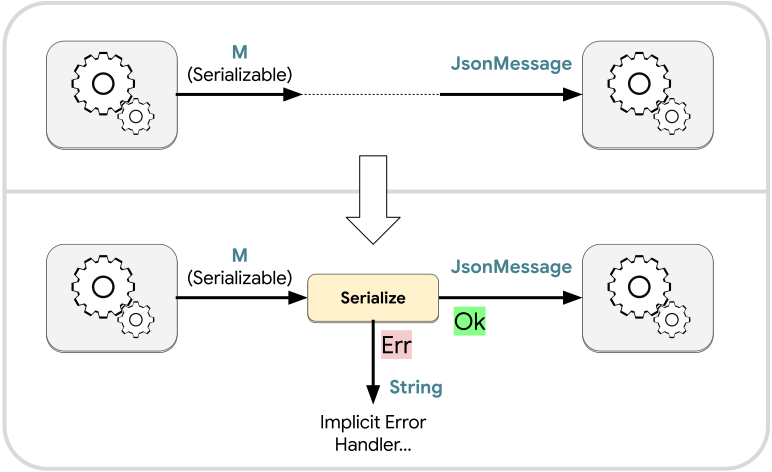
When a message type M is serializable, the workflow builder will automatically insert a conversion from M to JsonMessage when an output of M is connected to an input slot of JsonMessage:
Similarly when a JsonMessage output is connected to an input slot expecting a deserializable message M, the workflow builder will automatically insert a conversion from JsonMessage to M:
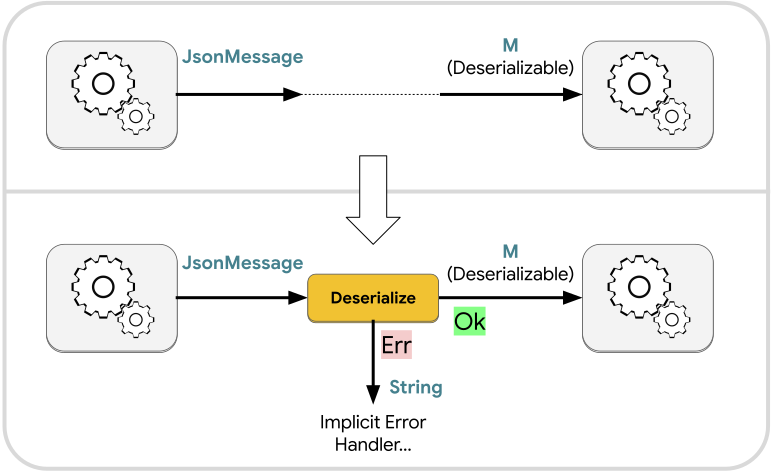
In both cases there is a risk that the serialization or deserialization will fail.
This is especially a concern for deserialization, since there is a wide space of JsonMessage values that cannot be successfully deserialized into an arbitrary data type M.
There are significantly fewer ways in which serialization can fail, but the possibility does still exist.
For both automatic serialization and deserialization, we call the failure case an implicit error.
Implicit Errors
Implicit errors are error-related outputs that were not explicitly created by the user but which may occur because of unexpected circumstances. They can be thought of as similar to exceptions from conventional programming. The implicit serialize and implicit deserialize operations are examples of places where implicit errors may be produced.
The diagram schema provides an on_implicit_error hook that lets you specify what should be done with implicit errors.
Similarly the scope operation schema also provides on_implicit_error.
You can set these fields to a valid input slot within the scope, or to a builtin target.
Implicit error handling is managed per scope, so the on_implicit_error of a parent scope has no effect on its nested scopes.
If on_implicit_error for a scope is not set to anything, then the default behavior is to trigger cancellation.
In the case of implicit serialization or deserialization, the serialization/deserialization failure message will be stringified and passed along as the cancellation message.
Some operations that can produce errors will automatically connect their errors to the on_implicit_error handler if you don’t specify what should be done with it.
For example the Transform schema has an optional on_error field.
Setting that field will pass transformation errors along to whichever target you specify, but leaving it unset will cause the Transform operation to connect its errors to the implicit error handler of the current scope.