Buffers
When services are connected together in a workflow, the next service in a chain will receive input messages as soon as they’re produced. But sometimes when a service is finished, the message that it produces can’t be used right away. It may need to wait for some other service to finish first, so their results can be combined.
For example, if we want to bake an apple pie, we don’t need to wait for the oven to preheat before we chop the apples, or vice versa. These can be done in parallel, but we need both to be done before we can begin baking the pie:
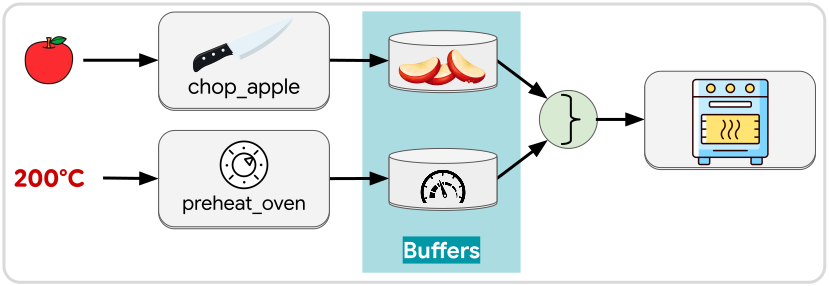
To make this work, we capture the output of each service—chop_apple and
preheat_oven—in a separate buffer. A buffer is a workflow element that
can capture messages for later use. There are numerous ways and reasons to use a
buffer, but a some examples include:
- Hold messages until the workflow is ready to consume them (similar to “places” in Petri Nets)
- Track the internal state of workflow (similar to the “blackboard” in behavior trees)
In our apple pie use case, we want to see that the “apple chopped” and “temperature ready” buffers both have a message before we pull those messages out of the buffers and pass the apples along to be baked.
Tip
Buffer settings allow you to specify how many messages a buffer can retain. You can also specify whether to discard the oldest or the newest messages when the limit is reached.
This allows buffers to handle buildups of data if one branch is generating messages at a higher frequency than another branch that it needs to sync with.
Certain operations take buffers instead of messages as inputs. Those operations will be activated on any change in any of the buffers connected to them, although the exact behavior depends on the operation. Some examples are join and listen, covered in the next two pages.