Listen
While join can handle basic synchronization between branches, sometimes the buffers need to be managed with more nuanced logic than simply pulling out their oldest values. This is especially true if your workflow expresses a state machine where different state transitions may need to take place based on the combined values of multiple buffers.
Suppose a vehicle is approaching an intersection with a traffic signal. While we approach the intersection we’ll monitor the traffic signal, streaming the latest detection into a buffer. At the same time, the robot will approach the intersection.
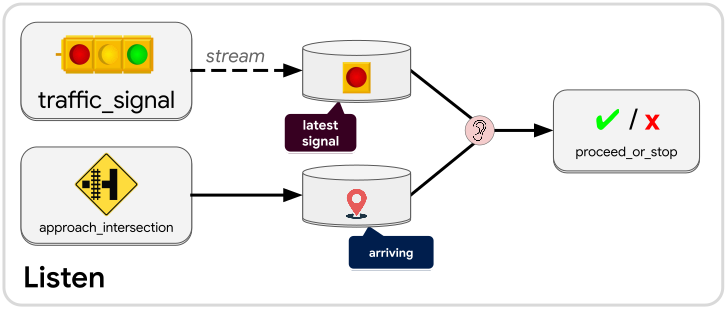
Once the vehicle is close enough to the intersection, a decision must be made: Should the vehicle stop before reaching the intersection, or just drive through it? If the traffic signal is red, we will ask the vehicle to stop, but then once the signal turns green we will need to tell the vehicle to proceed.
To express this in a workflow we create two buffers: latest_signal and arriving.
We create a listen operation (listener) that connects to both buffers. Every time
a change is made to either buffer, the listener will output a message containing
a key for each buffer. Those buffer keys allow a service to freely
access the contents of the buffers and even make changes to the
contents of each.
Let’s translate these requirements into how proceed_or_stop should manipulate
the buffers when activated under different circumstances:
- If the
arrivingbuffer is empty then do nothing because the vehicle is not near the intersection yet (or has already passed the intersection). - If the
arrivingbuffer has a value andlatest_signalis red, leave thearrivingbuffer alone and command the vehicle to come to a stop. By leaving thearrivingbuffer alone, we can continue to listen forlatest_signalto turn green. - If the
arrivingbuffer has a value andlatest_signalis green, drain thearrivingbuffer and command the vehicle to proceed. With thearrivingbuffer now empty, the listener will no longer react to any updates tolatest_signal. - (Edge case) If the
arrivingbuffer has a value andlatest_signalis empty, treatlatest_signalas though it were red (come to a stop) to err on the side of caution.
If we had tried to use the join operation for this logic, we would
have drained the arriving buffer the first time that both buffers had a value.
If the value in latest_signal were red then we would be prematurely emptying
the arriving buffer, and then we would no longer be waiting for the green traffic
signal.
Note
A listen operation (listener) will be activated each time any one of the buffers connected to it gets modified. The listener will pass along buffer keys that allow services to read and write to those connected buffers. Listeners will not be activated when a buffer is modified using one of the listener’s own buffer keys. This prevents infinite loops where a listener endlessly gets woken up by a downstream modification. You can choose to turn off this safety mechanism with
allow_closed_loops.
Accessor
Just like any other operation in a workflow, the listen operation produces a message that can be connected to an input slot of a compatible node or other kind of operation. Similar to join, the listen operation can infer what message type it should produce based on what downstream operation it’s connected to. However the listen operation specifically creates an Accessor—a data type that gives access to one or more buffers within the workflow.
The most basic accessor is a BufferKey<T> which gives access to a
buffer containing messages of type T. There are some opaque buffer keys like
JsonBufferKey and AnyBufferKey which do not
reveal the underlying message type within the buffer but allow you to interact
with the buffer data within the limitations of JsonBufferMut
and AnyBufferMut respectively.
In many cases you will want to receive multiple keys from a listener because
it is often useful to listen to multiple buffers at once. The keys you get from
the listener might be for buffers with different message types, and each key might
have its own particular purpose or identity. You can define a custom accessor type
in Rust using the Accessor macro:
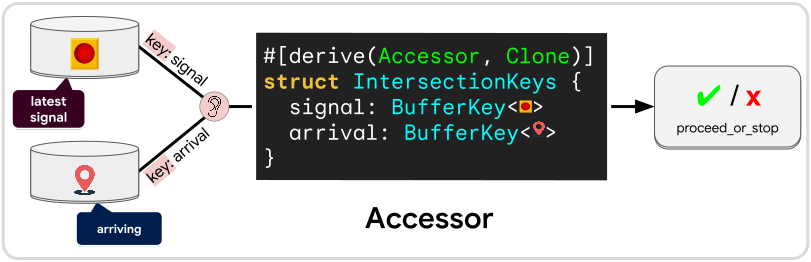
Simply create a struct whose fields are all buffer key types (which may include
JsonBufferKey and AnyBufferKey). Derive
Accessor and Clone for your custom struct. Use this custom struct as the
input type of your service. When you connect a listener to a node that uses your
service, it will know that it needs to create this struct for you.
When using a custom accessor, the buffers connected to the listener will need to
specify a key name for their connection, much like they do when
joining into a struct. That key name tells the
listen operation which field that buffer’s key should be placed in. If there is
ever a mismatch between key names or buffer types, or if any field is missing a
connection or has multiple connections, then you will get an IncompatibleLayout
error when building from a JSON diagram. When using the native Rust API any
incompatibility will produce a compilation error.
Tip
To learn how to use an accessor within your service, see Using an Accessor.