Join Rates
The default behavior that you get from joining two buffers fits typical fork-then-join uses cases:
- Each buffer will hold up to one message. Older messages get dropped when new messages arrive.
- When the join is performed, the single message in each buffer will be pulled out, leaving all the buffers empty.
However this might not be the behavior you want in all uses cases of join. Sometimes branches that lead into a join will each be streaming messages at different rates. The settings you have for your buffer and your join operation could yield different outcomes depending on the message rates of the different branches.
Here’s an example of a branch that’s producing localization data (top) being joined with another branch producing camera data (bottom):
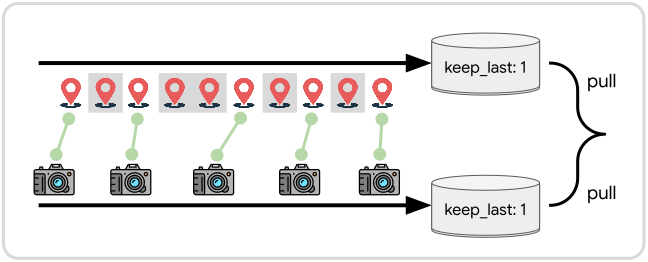
With both buffers having keep_last: 1 and being joined by pulling (rather than cloning) from both, you can see that some of the location data—which is being streamed down the branch faster—will be dropped because new location samples will enter the buffer before the older samples get pulled out for a join.
Suppose we have the opposite case where our robot moves infrequently and we want to pair up incoming camera samples with whatever the last known location happens to be.
For that we can stick with the keep_last: 1 setting for both buffers, but use fetch-by-clone for the location data:
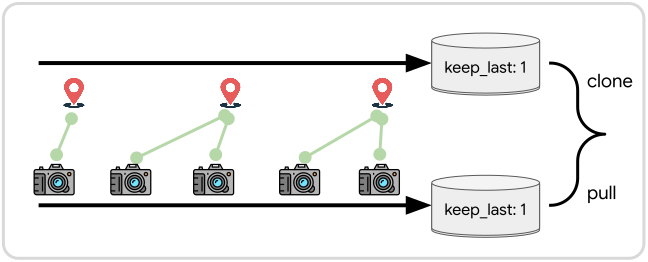
The above two setups work well enough if incoming samples are fungible, meaning we don’t care about exactly which messages get paired up between the branches. They might not work so well if there are specific messages that are supposed to be paired across the branches.
Suppose we have two branches that are each processing a batch of sensor data. The batch of sensor data contains pairs of samples that are related by a timestamp or some other important context. The data gets unzipped and sent down different branches to be processed based on the type of data it is:
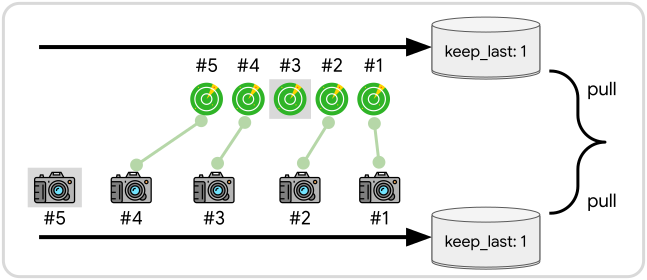
If one branch finishes processing its batch of data faster than the other branch, the join operation could accidentally pair up unrelated samples. In the above example, lidar sample #3 and camera sample #5 will end up discarded. Meanwhile lidar samples #4 and #5 will be paired with the wrong camera samples.
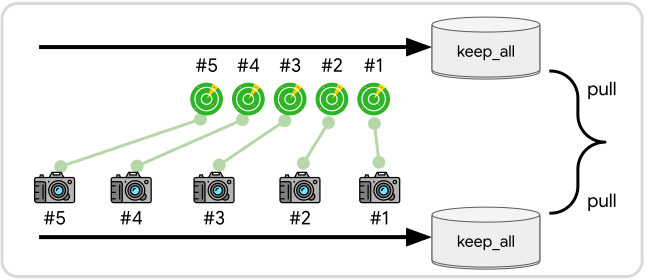
If you want to ensure that messages from the two branches are always paired up sequentially, you can simply set the buffer to use keep_all:
Warning
When using
keep_all, make sure that the number of messages arriving from each branch will eventually equalize or else one buffer will grow unbounded, and may take up an excessive amount of RAM.
Tip
If you need more sophisticated logic to pair up samples across different branches—e.g. comparing their timestamp fields before deciding whether to join them—then you will need to use a custom listener instead of join.