Using an Accessor
Buffers can act similar to the “blackboard” concept in behavior trees—a repository of data shared across the different services in your workflow. To achieve thread-safe high-performance access to buffer data, we rely on Bevy’s ECS.
Buffers are implemented as entities with certain components attached.
This means their data is stored in Bevy’s highly optimized memory management system, that can automatically provide safe parallel access if you use continuous services.
The catch is, to access that data you need to use services or callbacks which can support system parameters.
In particular you need to use the BufferAccess system parameter for read-only parallelizable access, or BufferAccessMut for exclusive read/write access.
Note
Maps cannot access buffer data. In general maps cannot use system parameters, making them slightly more efficient than services or callbacks, but leaving them unable to do as much.
With Access
To grant a service access to a buffer, you must provide it with a BufferKey.
The two typical ways to obtain a buffer key are through the listen operation or the buffer access operation.
- The listen operation will send out a message containing one or more buffer keys when the buffers attached to it are modified.
- The buffer access operation will append a buffer key to a message that’s in flight from one node to another.
The important thing is that a BufferKey is somehow present inside the message data that gets passed into the service.
The following example shows the Chain::with_access method adding a buffer key to messages that are being passed into some services.
It also shows how those services use BufferAccess and BufferAccessMut to view and modify the contents of a buffer.
use crossflow::{prelude::*, testing::*};

/// Use mutable access (BufferAccessMut) to push values into a buffer. The
/// values are guaranteed to be present in the buffer before this service
/// finishes running. Therefore any service that accesses the buffer after this
/// service finishes is guaranteed to find the values present inside.
fn push_values(
    Blocking { request: (data, key), id, .. }: Blocking<(Vec<i32>, BufferKey<i32>)>,
    mut access: BufferAccessMut<i32>,
) {
    let Ok(mut access) = access.get_mut(id, &key) else {
        return;
    };
    for value in data {
        access.push(value);
    }
}

/// Use read-only access (BufferAccess) to look through the values in the
/// buffer. We pick out the largest value and clone it to pass it along. This
/// read-only access cannot pull or modify the data inside the buffer in any
/// way, it can only view and clone (if the data is cloneable) from the buffer.
fn get_largest_value(
    Blocking { request, id, .. }: Blocking<((), BufferKey<i32>)>,
    mut access: BufferAccess<i32>,
) -> Option<i32> {
    let access = access.get(id, &request.1).ok()?;
    access.iter().max().cloned()
}

let mut context = TestingContext::minimal_plugins();

let workflow = context.spawn_io_workflow(|scope, builder| {
    let buffer = builder.create_buffer(BufferSettings::keep_all());
    builder
        .chain(scope.start)
        .with_access(buffer)
        .then(push_values.into_callback())
        .with_access(buffer)
        .then(get_largest_value.into_callback())
        .connect(scope.terminate);
});

let mut outcome = context.command(|commands| {
    commands.request(vec![-3, 2, 10], workflow).outcome()
});

context.run_with_conditions(&mut outcome, Duration::from_secs(1));

let r = outcome.try_recv().unwrap().unwrap();
assert_eq!(r, Some(10));
Listen
The buffer access operation (with_access) only gets activated when a message is emitted by some operation output. To monitor the contents of one or more buffers directly, you need to use listen. The listen operation connects to one or more buffers and gets activated any time a modification is made to the contents of any one of the buffers connected to it.
When listen is activated, is passes along an accessor as a message. Unlike the buffer access operation, the message produced by a listener is nothing but a collection of buffer keys. For the listen operation to be useful, you need to send its message to a service that will do something with those keys.
The following code example recreates a simple intersection crossing workflow:
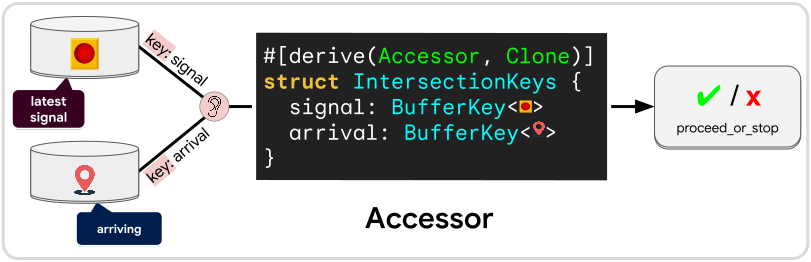
/// Derive the Accessor trait so this struct of keys can be constructed by the
/// listen operation. Note that Accessor also requires Clone to be defined.
#[derive(Accessor, Clone)]
struct IntersectionKeys {
    signal: BufferKey<TrafficSignal>,
    arrival: BufferKey<[f32; 2]>,
}

/// Define a device that evaluates whether or not the robot should proceed
/// across the intersection.
fn proceed_or_stop(
    Blocking { request: keys, id, .. }: Blocking<IntersectionKeys>,
    mut signal_access: BufferAccess<TrafficSignal>,
    mut arrival_access: BufferAccessMut<[f32; 2]>,
) -> Option<RobotCommand> {
    let signal_buffer = signal_access.get(id, &keys.signal).ok()?;
    let mut arrival_buffer = arrival_access.get_mut(id, &keys.arrival).ok()?;

    // Get a reference to the newest message if one is available
    let signal = signal_buffer.newest()?;
    // Pull the value from this buffer is one is available
    let arrived = arrival_buffer.pull()?;

    match signal {
        TrafficSignal::Green => Some(RobotCommand::Go),
        TrafficSignal::Red => Some(RobotCommand::Stop),
    }
}

let workflow = commands.spawn_io_workflow(
    |scope, builder| {
        // Create buffers to store the two state variables:
        // * what the current traffic signal is
        // * whether the robot has reached the intersection
        let signal = builder.create_buffer(Default::default());
        let arrived = builder.create_buffer(Default::default());

        // Create services to update the two state variables
        let traffic_signal_service = builder.create_node(traffic_signal_service);
        let approach_intersection = builder.create_node(approach_intersection);

        // Activate both of the state update services at startup
        builder
            .chain(scope.start)
            .fork_clone((
                |chain: Chain<_>| chain.connect(traffic_signal_service.input),
                |chain: Chain<_>| chain.connect(approach_intersection.input),
            ));

        // Connect the services to their respective buffers. For the traffic
        // signal we connect its stream, because the signal will be changing
        // over time. For the arrival state we connect the output of the
        // approach_intersection service because the robot will only ever
        // approach the intersection once.
        builder.connect(traffic_signal_service.streams, signal.input_slot());
        builder.connect(approach_intersection.output, arrived.input_slot());

        builder
            // Create a listen operation that will activate whenever either the
            // traffic signal or arrival buffer has an update
            .listen(IntersectionKeys::select_buffers(signal, arrived))
            // When an update happens, provide both buffer keys to a node that
            // will evaluate if the robot is ready to cross
            .then(proceed_or_stop.into_callback())
            // If no decision can be made yet (e.g. one of the buffers is
            // unavailable) then just dispose this message
            .dispose_on_none()
            // If a decision was made, send a command to the robot
            .then(send_robot_command)
            // The previous service will return None if the command was to stop.
            // If the command was to go, then it will return Some after the robot
            // finishes crossing the intersection.
            .dispose_on_none()
            // Terminate when the robot has finished crossing.
            .connect(scope.terminate);
    }
);
Gate
Besides being able to access the data in buffers, you can also use a buffer key to open and close the gate of the buffer. When a the gate of a buffer is closed, listeners will not be notified when the content of the buffer gets modified. However this does not prevent the buffer from being accessed by any services that have a key for it.
Note
Closing a buffer gate has no effect on the buffer access operation.
fn manage_opening_time(
    Blocking { request: (time, key), id, .. }: Blocking<(SystemTime, BufferKey<Order>)>,
    mut gate: BufferGateAccessMut,
    hours: Res<WorkingHours>,
) {
    let Ok(mut gate) = gate.get_mut(id, key) else {
        return;
    };

    if time < hours.open || hours.close < time {
        gate.close_gate();
    } else {
        gate.open_gate();
    }
}