Using Buffers
Buffers are an important element of complex workflows. They are the key to both synchronizing parallel activity inside of a workflow and also tracking the overall state of the workflow.
Crossflow uses Bevy’s ECS to manage the data inside of buffers. This means if you want a node to directly access the data inside of a buffer you will need to implement the node with a service or a callback and use an accessor, which is explained on the next page.
joining
In an earlier example we saw how to join two branches by connecting their outputs with the Builder::join method.
In reality, joining two or more outputs is implemented by creating a buffer with default settings for each output and then performing the join operation on that set of buffers.
Tip
For a conceptual review of the different buffer and join settings, visit the Join Rates chapter.
The automatic conversion from Output to Buffer is great for ergonomics, especially when building chains, but it’s important to know how to explicitly create buffers when needed.
keep_all
Suppose we want to process batches of lidar data and camera data in order to perform localization. Each kind of data is processed at different rates, but there are pairs of data between the types that need to be bundled back together, like in this figure:
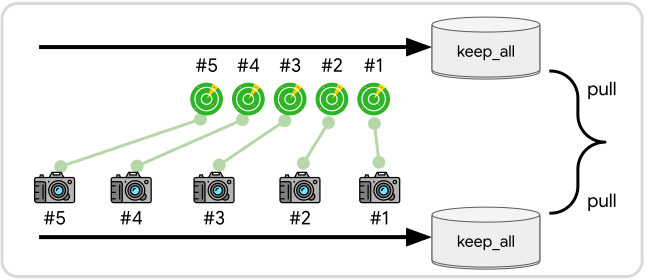
To set this up in a workflow, we can explicitly create each of the buffers with the keep_all setting as seen in this code example:
let workflow = commands.spawn_io_workflow(
    |scope, builder| {
        let lidar_buffer = builder.create_buffer(BufferSettings::keep_all());
        let camera_buffer = builder.create_buffer(BufferSettings::keep_all());

        let localization_data = builder.join(
            LocalizationData::select_buffers(lidar_buffer, camera_buffer)
        );
    }
);
The data from the buffers will be joined into LocalizationData, defined here:
#[derive(Joined)]
struct LocalizationData {
    lidar: LidarData,
    camera: CameraData,
}
Notice that LocalizationData has derived the Joined trait which allows it to be an output of the join operation.
Deriving Joined also implements the select_buffers method for the struct, allowing you to easily set the buffer that will feed into each field.
fetch-by-clone
By default the join operation will always pull messages out of their buffers once all the buffers are ready to be joined. In some cases you may want to clone one of the messages out instead of pulling it. For example, here we want to stamp each camera image with whatever last reported location the robot had:
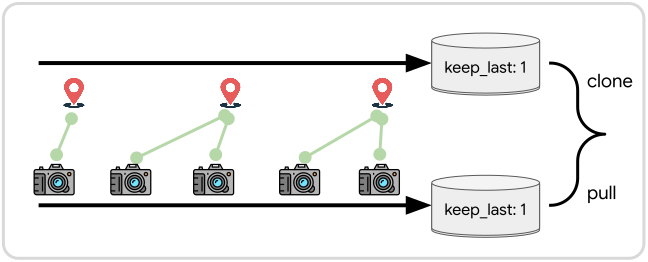
Since keep_last: 1 is the default buffer setting, we can just use BufferSettings::default() when creating the buffers.
What we need to do differently is apply .join_by_cloning() to the location_buffer when creating the join operation:
let workflow = commands.spawn_io_workflow(
    |scope, builder| {
        let location_buffer = builder.create_buffer(BufferSettings::default());
        let camera_buffer = builder.create_buffer(BufferSettings::default());

        let image_stamped = builder.join(ImageStamped::select_buffers(
            // Use .join_by_cloning() to have the location data cloned instead
            // of pulled for each join operation.
            location_buffer.join_by_cloning(),
            camera_buffer,
        ));
    }
);
Note
The
.join_by_cloning()method can be used on any buffer whose message type implements theClonetrait. The choice to clone instead of pull is made per buffer in each join operation that gets created. The same buffer can take part in multiple join operations with different clone/pull settings for each of those joins.