How to Spawn a Service
For crossflow to be useful, you first need to have a Service
to run. You may be able to find thirdparty libraries that provide some services
for you to use, but this chapter will teach you how to spawn them yourself just
in case you need to start from scratch.
What is a service?
In its most distilled essence, a service is something that can take an input message (request) and produce an output message (response):
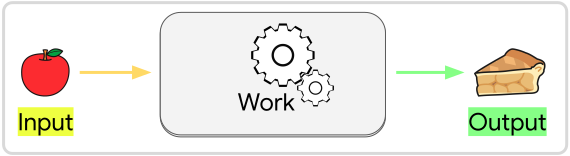
Each service expresses its request and response types as generic parameters in
the Service struct. These Request and Response parameters can be
any data structures that can be passed between threads.
Tip
We mean “data structures” in the broadest possible sense, not only “plain data”. For example, you can pass around utilities like channels and publishers as messages, or use them as fields inside of messages. Any valid Rust
structthat can be safely moved between threads can be used as a message.
The Service data structure itself is much like a function pointer. It contains
nothing besides an Entity
(a lightweight identifier that points to the service’s location in the
World) and the
type information that ensures you send it the correct Request type and that you
know what Response type to expect from it. When you copy or clone a Service,
you are really just making a copy of this identifier. The underlying service
implementation that will be called for the copy is the exact same as the original.
Spawn a Blocking Service
The simplest type of service to spawn is called a “blocking” service. These services are much like ordinary functions: They receive an input, run once for that input, and immediately return an output value. Much as the name implies, a blocking service will block all other activity in the schedule until it is done running. Therefore blocking services must be short-lived.
To define a blocking service, create a function whose first input argument is a BlockingService:
fn sum(srv: BlockingService<Vec<f32>>) -> f32 {
    let mut sum = 0.0;
    for value in srv.request {
        sum += value;
    }
    sum
}
This function will define the behavior of our service: The request (input)
message is provided as a field of the BlockingService argument. The request
type is based on the first generic T of BlockingService<T>—in this case a
Vec<f32>. The purpose of this sum service is to sum up the elements
in the request vector. The output of the service is a simple f32, which is
specified by the return type of the service function.
Before we can run this function as a service, we need to spawn an instance of it.
We can use the AddServicesExt trait for this, automatically available when you use crossflow::prelude::*:
let sum_service: Service<Vec<f32>, f32> = app.spawn_service(sum);We can spawn the service while building our Bevy App to make sure that it’s
available whenever we need it. A common practice is to save your services into
Components or Resources so
they can be accessed at runtime when needed.
Now that you’ve seen how to spawn a system, you could move on to How to Run a Service. Or you can continue on this page to learn about the more sophisticated abilities of services.
Services as Bevy Systems
A crucial concept in Bevy is systems.
Bevy uses an Entity-Component-System (ECS)
architecture for structuring applications. Systems are how an ECS architecture
queries and modifies the data in an application. In crossflow, services are
Bevy systems, except instead of being scheduled like most systems, a service only
gets run when needed, taking in an input argument (request) and returning an output
value (response). Since they are Bevy systems, services can query and modify the
entities, components, and resources in the World.
In the example from the previous section, you may have noticed In(input): ....
That In is a
special type of SystemParam
for a value that is being directly passed into the system rather than being
accessed from the world. For blocking services we pass in a
BlockingService as the input, which contains the request data,
output streams, and some other fields that represent metadata about the service.
Just like any other Bevy system, you can add as many system params to your service
as you would like. Here is an example of a blocking service that includes a
Query:
#[derive(Component, Deref)]
struct Offset(Vec2);

fn apply_offset(
    BlockingService { request, provider, .. }: BlockingService<Vec2>,
    offsets: Query<&Offset>,
) -> Vec2 {
    let offset = offsets
        .get(provider)
        .map(|offset| **offset)
        .unwrap_or(Vec2::ZERO);

    request + offset
}
First we define a component struct named Offset which simply stores a
Vec2. The job of our
apply_offset service is to query for Offset stored for this service and apply
it to the incoming Vec2 of the request.
To query the Offset we add offsets: Query<&Offset> as an argument (a.k.a.
system param) for our service function (a.k.a. system). One of the fields in
BlockingService is provider, which is the Entity
that provides this service. You can use this entity to store data that allows
the behavior of the service to be configured externally. In this case we will
store an Offset component in the provider to externally configure what kind
of Offset is being applied.
When spawning the service, you can use .with to initialize the provider entity:
let apply_offset_service: Service<Vec2, Vec2> = app.spawn_service(
    apply_offset
    .with(|mut srv: EntityWorldMut| {
        srv.insert(Offset(Vec2::new(-2.0, 3.0)));
    })
);
Note
All workflows that use this service will see the same
provider, and therefore see the same offset. Any changes made to the components of thatproviderwill affect all workflows that use the service.
In general you can use Service::provider
to access the provider entity at any time, and use all the normal Bevy mechanisms
for managing the components of an entity.
Full Example
use crossflow::bevy_app::App;
use crossflow::prelude::*;

use bevy_derive::*;
use bevy_ecs::prelude::*;
use glam::Vec2;

fn main() {
    let mut app = App::new();
    app.add_plugins(CrossflowExecutorApp::default());

    let offset = Vec2::new(-2.0, 3.0);

    let service = app.spawn_service(apply_offset.with(|mut srv: EntityWorldMut| {
        srv.insert(Offset(offset));
    }));

    let mut outcome = app
        .world_mut()
        .command(|commands| commands.request(Vec2::ZERO, service).outcome());

    for _ in 0..5 {
        if let Some(response) = outcome.try_recv() {
            let response = response.unwrap();
            assert_eq!(response, offset);
            println!("Successfully applied offset: {response:?}");
            return;
        }

        app.update();
    }

    panic!("Service failed to run after multiple updates");
}

#[derive(Component, Deref)]
struct Offset(Vec2);

fn apply_offset(
    BlockingService {
        request, provider, ..
    }: BlockingService<Vec2>,
    offsets: Query<&Offset>,
) -> Vec2 {
    let offset = offsets
        .get(provider)
        .map(|offset| **offset)
        .unwrap_or(Vec2::ZERO);

    request + offset
}
More kinds of services
If you are interested in non-blocking service types, continue on to Async Services and Continuous Services.
If you need your service to be a portable object that isn’t associated with an entity, take a look at Callbacks. If you don’t care about your service being a Bevy system at all (i.e. it should just be a plain function with a single input argument) then take a look at Maps.
If blocking services are enough to get you started, then you can skip ahead to How to Run a Service.