Async Services
We’ve seen how to spawn a blocking service, but blocking services have an important drawback: While a blocking service is running, no other systems or services in the system schedule can run. This allows blocking services to have unfettered instant access to all resources in the bevy World, but long-running blocking services would disrupt the app schedule. This does not mean that blocking services should be avoided—they are the fastest and most CPU efficient choice for any short-lived service, especially when accessing Bevy Components or Resources. Each kind of service fits a different shape of usage, so go ahead and use blocking services when they fit.
When it comes to long-running services, it’s likely that an async service is what you want. In crossflow, async services allow you to take full advantage of the async/await language feature of Rust when implementing a service. For a detailed explanation of the language feature you might want to look at the official Rust handbook. Using async services does not require a deep understanding of async in Rust, but some peculiarities might make more sense if you have a better grasp of it.
What is an async service?
A normal Bevy app has a system schedule which can be thought of as the main event loop of the application. The system schedule is able to run many systems at once as long as those systems do not have any read/write conflicts in which world resources they need to access. Bevy will automatically identify which systems can be run in parallel and run them together unless you specify otherwise.
Some systems demand exclusive world access, meaning no other systems can run alongside it. While this reduces opportunities for parallel processing, it empowers the exclusive systems to themselves dynamically run systems whose data access requirements are not known when the schedule is first being built.
The flush_execution system of crossflow drives all the services that need to be
executed. Since we never know ahead of time which services might need to be run
or what they will need to acess from the world, flush_execution is an exclusive
system.
Inside of flush_execution we will execute any services that are ready to be
executed—one at a time since we can’t be sure which might have read/write
conflicts with each other. When we execute a blocking service, we pass the
request into it and get back the response immediately. We can then pass that
response message along to its target service, and then immediately execute that
target service. An arbitrarily long chain of blocking services can all be executed
within a single run of flush_execution, unless flush_loop_limit
is set.
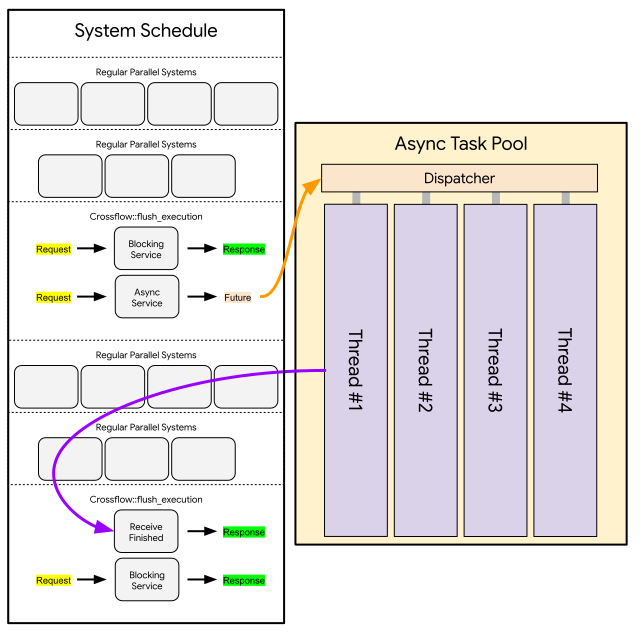
If the blocking service runs for a very long time, the entire system schedule would be held up, which could be detrimental to how the application behaves. In a GUI application, users would see the window freeze up. In a workflow execution application, clients would think that all execution has frozen. This means blocking services are not suitable for any service that represents a physical process or involves i/o with external resources.
Fortunately Bevy provides an async task pool that runs
in parallel to the system schedule and supports async functions.
An async service task advantage of this by producing a Future instead of
immediately returning a response. Crossflow sends that Future into the async
task pool to be processed efficiently alongside other async tasks. Once the
Future has yielded its final response, flush_execution will receive the response
message and pass it along to the next service in the chain.
We get two advantages with async services:
- They are processed in the async task pool, allowing them to run in parallel to the system schedule, no matter which systems are running at any given time.
- They can use
awaitin their their Future, which is a powerful language feature of Rust that allows efficient and ergonomic use of i/o and multi-threading.
However there are some disadvantages to be mindful of:
- Sending the Future to the async task pool and receiving the response has some overhead (albeit relative small in most cases).
- The response of an async service will generally not arrive within the same schedule update that the service was activated. This means a chain of N async services will typically take at least N schedule updates before finishing.
- Each time the Future of an async service needs to access the world (using its async channel) it takes up to one whole schedule update to get that access.
Spawn an Async Service
Spawning an async service is similar to spawning a blocking service,
except that your function should take in an AsyncService<Request> and be async:
async fn trivial_async_service(srv: AsyncService<String>) -> String {
    return srv.request;
}
If your function matches these requirements, then you can spawn it with the exact same API as the blocking service:
let async_service: Service<String, String> = app.spawn_service(trivial_async_service);Notice that even though this is an async service and has some different behavior
than blocking services under the hood, it is still captured as a Service.
Once spawned as a service, blocking and async services will appear exactly the
same to users.
await
Since async services are defined via async functions, they are able to use Rust’s await feature, which is often used for network i/o and communicating between parallel threads. Here’s an example of a service that gets the title of a webpage based on a URL passed in as the request message:
async fn page_title_service(srv: AsyncService<String>) -> Option<String> {
    let response = trpl::get(&srv.request).await;
    let response_text = response.text().await;
    trpl::Html::parse(&response_text)
        .select_first("title")
        .map(|title| title.inner_html())
}
This example is adapted from the Rust handbook.
Note that this service returns an Option<String> since we can’t guarantee that
the input URL points to an actual website or that we will successfully retrieve
its title even if it does.
Use the Async Channel
One drawback of using an async service is that it doesn’t have free access to the World (particularly Components and Resources) the way a blocking service does. It would be impossible to provide that kind of access for something running in the async task pool because any time it tries to access data that’s stored in the world, it could encounter a conflict with a scheduled system that’s accessing the same data.
Nevertheless, async services may need to push or pull data into/from the World
while they make progress through their async task. To accommodate this, we provide
async services with a Channel that supports querying or sending
commands to the World:
/// A component that stores a web page title inside an Entity
#[derive(Component)]
struct PageTitle(String);

/// A request that specifies a URL whose page title should be stored inside an Entity
struct PageTitleRequest {
    url: String,
    insert_into: Entity,
}

/// A service that fetches the page title of a URL and stores that into an Entity.
async fn insert_page_title(
    srv: AsyncService<PageTitleRequest>
) -> Result<(), ()> {
    let response = trpl::get(&srv.request.url).await;
    let response_text = response.text().await;
    let title = trpl::Html::parse(&response_text)
        .select_first("title")
        .map(|title| title.inner_html())
        .ok_or(())?;

    let insert_into = srv.request.insert_into;
    // Use the async channel to insert a PageTitle component into the entity
    // specified by the request, then await confirmation that the command is finished.
    srv.channel.commands(
        move |commands| {
            commands.entity(insert_into).insert(PageTitle(title));
        }
    )
        .await;

    Ok(())
}
In the above example, the insert_page_title service ends by inserting the result
of its http request into the component of an entity. This is done by invoking
srv.channel.command(_) and passing in a closure that says what
should be done with the Bevy commands.
Note that this command will itself be run asynchronously. It will be executed
the next time that flush_execution is run by the system schedule. If we want
to make sure our service does not return its response until the command is
carried out, we should .await the output of srv.channel.command(_). The
command will eventually be carried out even if we return without awaiting it,
but if the next service in the chain assumes the command has already finished
then you could experience race conditions.
Warning
Each time you await
srv.channelit may take up to an entire update cycle of the schedule before your response arrives. It’s a good idea to batch as many queries or commands as you can before awaiting to avoid wasting update cycles.
Async Services as Bevy Systems
It’s been mentioned that the task (a.k.a. Future) of an async service can only access the Bevy World through the async channel that it’s provided with. However, prior to its task being spawned, an async service does have a way to immediately access the entire World. This is useful when there is some data you know your task will need. You can query it from the World at no cost as soon as your async service is activated.
However there is a catch: Bevy system parameters (such as Query and
Res) are not compatible with the async fn syntax that is commonly
used to define async functions. The incompatibility is related to a logical
conflict between the way Bevy manages borrows of World data and the way
async fn creates a portable state machine that can be executed by an async
task pool. The details of this conflict aren’t important for using crossflow,
but suffice it to say you can’t use most Bevy system params and async fn in
the same function.
But there is a workaround! You can create an async function without using the
async fn syntax. You can use the regular fn syntax and use a return type of
impl Future<Output = Response>:
#[derive(Clone, Component, Deref)]
struct Url(String);

use std::future::Future;
fn fetch_page_title(
    srv: AsyncService<Entity>,
    url: Query<&Url>,
) -> impl Future<Output = Result<String, ()>> + use<> {
    // Use a query to get the Url component of this entity
    let url = url.get(srv.request).cloned();

    async move {
        // Make sure the query for the Url component was successful
        let url = url.map_err(|_| ())?.0;

        // Fetch the page title of the website stored in the Url component of
        // the requested entity.
        let response = trpl::get(&url).await;
        let response_text = response.text().await;
        trpl::Html::parse(&response_text)
            .select_first("title")
            .map(|title| title.inner_html())
            .ok_or(())
    }
}
At the start of your function it will behave just like a normal Bevy system.
Your arguments can be any Bevy system parameters that you’d like, and you can
use them freely in the initial lines of your function. But to satisfy the
signature of the function, you eventually have to return something that implements
the Future<Output = Response> trait.
The easiest way to create a Future is with an async block.
That block will produce an anonymous data structure that implements Future<Output=Response>
where Response will be whatever value the block yields. By ending our function
with an async move { ... }, it will behave like a regular blocking function in
the start and end as an async function. From the outside, it is indistinguishable
from an async function.
Tip
If you need your async service to start by querying the World, it’s a good idea to always follow this template exactly:
fn my_async_service(
    srv: AsyncService<Request>,
    /* ... Bevy System Params Go Here ... */
) -> impl Future<Output = Response> + use<> {
    /* ... Use Bevy System params, cloning data as needed ... */
    async move {
        /* ... Perform async operations ... */
    }
}
You can deviate from this template if you know what you are doing, but first make sure you have a sound understanding of how async works in Rust or else you might get unexpected behavior.
Full Example
Here is an example of an async service that uses everything discussed in this chapter.
Tip
This example shows how a tokio runtime can be used with an async service. Crossflow does not use tokio itself, since Bevy’s async execution is based on smol instead.
Many async functions in the Rust ecosystem depend on a tokio runtime, so this example may help you find ways to incorporate tokio into your async services.
use crossflow::bevy_app::App;
use crossflow::prelude::*;

use bevy_derive::*;
use bevy_ecs::prelude::*;
use clap::Parser;
use std::{future::Future, sync::Arc};
use tokio::runtime::Runtime;

/// Program that demonstrates an async service in crossflow
#[derive(Parser, Debug)]
#[command(version, about)]
struct Args {
    /// Url that we should fetch a page title from
    url: String,
}

fn main() {
    let args = Args::parse();
    let mut app = App::new();
    app.add_plugins(CrossflowExecutorApp::default());

    let service = app.spawn_service(update_page_title);

    let entity = app.world_mut().spawn(Url(args.url)).id();

    let mut outcome = app
        .world_mut()
        .command(|commands| commands.request(entity, service).outcome());

    // Create a tokio runtime and drive it on another thread
    let (finish, finished) = tokio::sync::oneshot::channel();
    let rt = Arc::new(tokio::runtime::Runtime::new().unwrap());
    app.world_mut()
        .insert_resource(TokioRuntime(Arc::clone(&rt)));
    let tokio_thread = std::thread::spawn(move || {
        let _ = rt.block_on(finished);
    });

    let start = std::time::Instant::now();
    let time_limit = std::time::Duration::from_secs(5);
    while std::time::Instant::now() - start < time_limit {
        if let Some(response) = outcome.try_recv() {
            match response {
                Ok(_) => {
                    let title = app.world().get::<PageTitle>(entity).unwrap();
                    println!("Fetched title: {}", **title);
                }
                Err(err) => {
                    println!("Error encountered while trying to update title: {err}");
                }
            }

            let _ = finish.send(());
            let _ = tokio_thread.join();
            return;
        }

        app.update();
    }

    panic!("Service failed to run within time limit of {time_limit:?}");
}

/// A component that stores a web page title inside an Entity.
#[derive(Component, Deref)]
struct PageTitle(String);

/// A component that stores what url is assigned to an Entity.
#[derive(Clone, Component, Deref)]
struct Url(String);

/// A resource that provides access to a tokio runtime
#[derive(Resource, Deref)]
struct TokioRuntime(Arc<Runtime>);

/// A service that checks the Url assigned to an entity and then updates the page
/// title set for that entity.
fn update_page_title(
    srv: AsyncService<Entity>,
    url: Query<&Url>,
    runtime: Res<TokioRuntime>,
) -> impl Future<Output = Result<(), ()>> + use<> {
    // Use a query to get the Url component of this entity
    let url = url.get(srv.request).cloned();
    let rt = Arc::clone(&**runtime);

    async move {
        // Make sure the query for the Url component was successful
        let url = url.map_err(|_| ())?.0;

        // Fetch the page title of the website stored in the Url component of
        // the requested entity. This is run inside a tokio runtime because the
        // trpl library uses reqwest, which is a tokio-based http implementation.
        let title = rt
            .spawn(async move {
                let response = trpl::get(&url).await;
                let response_text = response.text().await;
                trpl::Html::parse(&response_text)
                    .select_first("title")
                    .map(|title| title.inner_html())
                    .ok_or(())
            })
            .await
            .map_err(|_| ())??;

        let entity = srv.request;
        srv.channel
            .commands(move |commands| {
                commands.entity(entity).insert(PageTitle(title));
            })
            .await;

        Ok(())
    }
}