Reflection
Reflective programming—also referred to as reflection—is when a program can introspect and modify its own structure or behavior. Crossflow does not currently support generalized reflection, which would imply that a workflow could change its connections or add new nodes and operations at runtime. However, it does support a few reflective operations which are able to inspect or modify the overall state of the workflow.
Most operations in crossflow are “localized”, meaning they don’t know anything about the workflow that they are in, except for the immediate neighbors that they are connected to. The reflective operations covered in this chapter have a broader view of the workflow that they exist in. They can be used to assess or modify the execution of the workflow at runtime.
Note
Theoretically it is possible to implement generalized reflection in crossflow. The main challenge is how to design an API that does not leave loose ends dangling while modifications are being made, or an API that can protect the user from unintuitive race conditions that may happen as the workflow transitions from one structure to another.
Trim
Warning
At the time of this writing, the trim operation is not yet available as a JSON diagram operation. This is being tracked by #59. In the meantime it can be put into a JSON diagram via the section builder operation.
Sometimes unbridled parallelism is a liability. If multiple branches want to make use of the same services, there could be destructive interference between the branches, depending on the nature of the services they are using.
Suppose we want to define a workflow for sending a robot to a location, but we need the workflow to check if the location is available before sending the robot. We are operating in a multi-robot environment, so we need to make sure we are not sending multiple robots to the same location at the same time.
We’ve been provided with a reserve_location service that takes in a target
location request and tries to reserve that location for our robot. If the location
is not available right away, then reserve_location will first stream out a
detour location for the robot to start moving towards. This detour location
will be a parking spot that is as close as possible to the final target location.
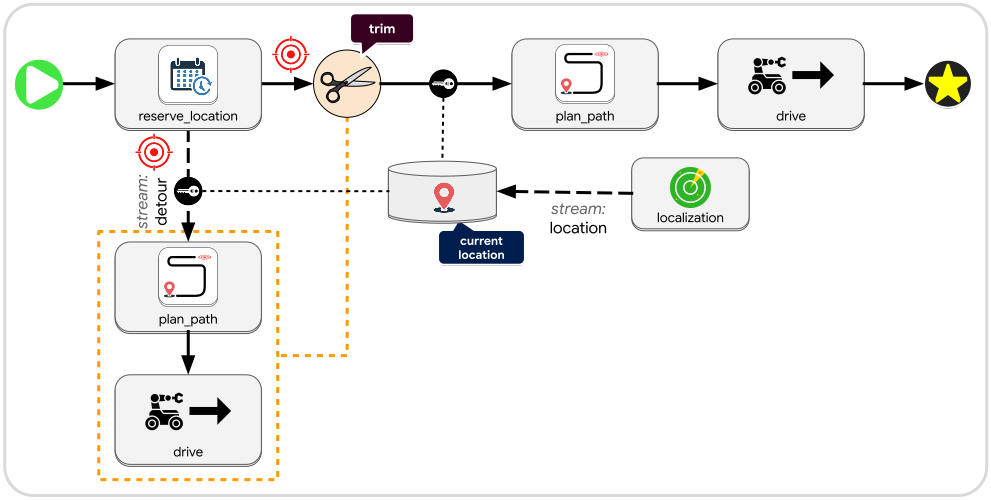
While the robot is heading to its detour location, the reserve_location service
will remain active until it gets a confirmation that the target location is
successfully reserved for our robot. Then the service will finish, passing along
the target location to a path planner which passes along a path to a drive
service. Once the robot reaches its target location, the drive service will
finish and terminate the workflow.
But what would happen if the drive services of both branches end up running at
the same time? The two simultaneously running services could end up fighting each
other to send the same robot towards different locations. To prevent this we can
use the trim operation.
As shown in the diagram above, before starting towards the target location, we
will apply the trim operation to the detour branch. All the operations that are
selected for trimming will undergo operation cleanup,
meaning whatever they happen to be doing will be brought to a stop. The trim
operation will wait until it gets notified that all the relevant operations have
finished their cleanup, and then trim will forward along its input message as
output. This ensures that it is impossible for multiple drive services to be
running at the same time.
Gate
Warning
At the time of this writing, the gate operation is not yet available as a JSON diagram operation. This is being tracked by #59. In the meantime it can be put into a JSON diagram via the section builder operation.
Trim allows you to stop ongoing activity in a node, but there is also an operation that allows you to prevent activity from starting in the first place. The gate close operation can be applied to a set of buffers to block any connected join and listen operations from waking up when those buffers are modified. The gate open counterpart undoes the effect of gate close, allowing the join and listen operations to resume.
Note
Closing a buffer gate does not block the buffer access operation, and it does not prevent buffer keys from working.
Whenever a buffer’s gate transitions from closed to open status, any attached join and listen operations will be activated, whether or not any new messages arrived. If the conditions of the join operation are not met, it simply won’t produce any message, but the listen operation will always produce its accessor message after a gate opens, because the gate status is considered part of the buffer’s state and therefore may be relevant to a listener.
Tip
A service that has a buffer key can check the status of that buffer’s gate status using
BufferGateViewand can modify the buffer’s gate status usingBufferGateMut.
This gating feature can be used to allow one branch of a workflow to manage the activity of another branch of the workflow. For example, suppose we are running a pie bakery with an online ordering system. We can have a service that watches a clock to stream out when the kitchen opening and closing times have arrived. Those streams can trigger our pie order buffer to pause or resume being sent to the kitchen:
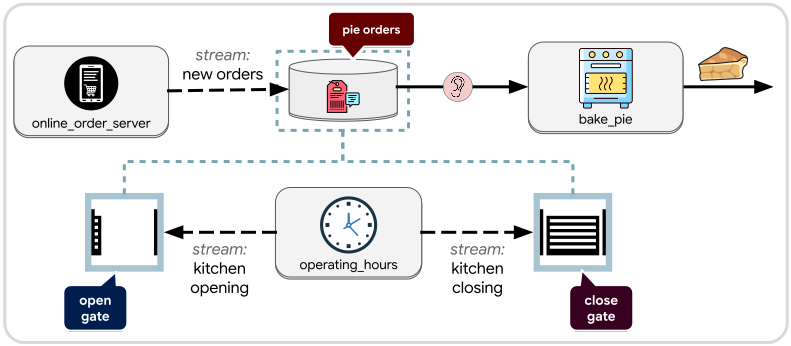
Any new orders that come in after closing hours will be placed in the buffer
instead of being sent to the kitchen. Once the kitchen opens, all the queued
orders will become visible to bake_pie service. While the kitchen is open, new
orders will be sent through immediately.
Note
Closing the gate of a buffer does not prevent new messages from being pushed into the buffer, but it will prevent join and listen operations from being aware of the push.
Inject
Warning
At the time of this writing, the inject operation is not yet available as a JSON diagram operation. This is being tracked by #59. In the meantime it can be put into a JSON diagram via the section builder operation.
Sometimes a single fixed workflow structure is not sufficient to define the behavior of a dynamic or intelligent system. A flexible state machine may need to decide its execution structure at runtime; perhaps the state machine itself needs to reconfigure its own execution structure during a state transition.
While crossflow does not support fully generalized reflection, it does support an inject operation that allows you to spawn a service at runtime and inject it into the node of a workflow from inside the workflow itself. The service that you spawn could itself be a workflow whose entire structure is decided by another service.
For example an ordinary path planning service might produce a simple path or trajectory for a controller to track, but a more intelligent path planning service might want to include instructions for how the robot should interact with other devices—such as doors, elevators, and other robots. A trajectory would not be sufficient to describe these interactions, but a runtime generated workflow would do the trick.
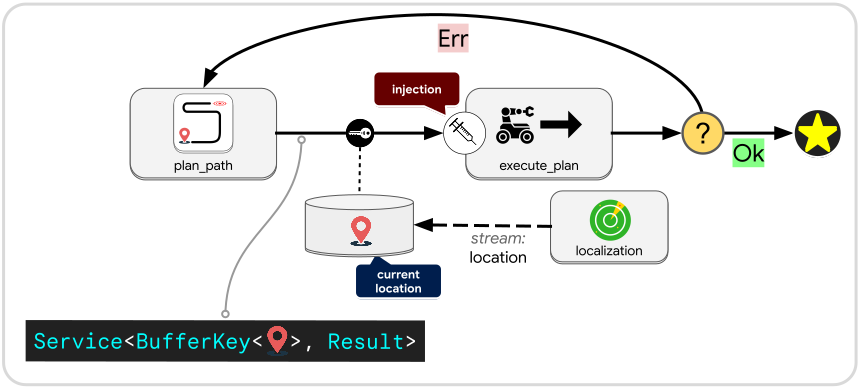
Instead of a trajectory message, the plan_path service will, itself, produce
a Service that it passes along as a message. That service will be
combined with a buffer key that gives access to the buffer that stores the
robot’s current location—which is what the generated service needs as an input
message—and then passed into the inject operation. From there, the inject
operation will pass the buffer key into the generated service and run it as if
it were a regular node in the workflow.
When the generated service finishes running it will produce a Result which is
Ok if the plan was successfully followed, otherwise an Err. In the Ok case
we simply terminate, while for an Err we will cycle back and ask for a new plan.
The new plan that gets generated after an Err could be a completely different
workflow than what previously ran, freshly generated to deal with the latest
circumstances.
In general the inject operation allows workflows to define state transitions that completely change the behavior of the state machine from transition to transition. In most cases this will be implemented in a two-tier structure with a fixed cyclical structure for the top-level state machine that dynamically generates and executes a lower-level state machine to define the evolving situational logic.
Collect
Warning
At the time of this writing, the collect operation is not yet available as a JSON diagram operation. This is being tracked by #59. In the meantime it can be put into a JSON diagram via the section builder operation.
Collect was already covered under synchronization, but it can also be considered a reflective operation. It creates a point in the workflow where no further progress will be made until all upstream activity has finished.