Scope Operation
So far we’ve talked about how every workflow has a scope with start, terminate, and optionally stream out operations. But sometimes it’s useful for a set of operations within a workflow to be scoped.
The scope operation allows you to nest a self-contained workflow inside of another workflow. It is fully equivalent to spawning the sub-workflow into a service and then inserting that service into a node in your workflow, except that there’s no intermediate service created: the sub-workflow lives entirely inside the scope operation of your workflow.
Every time the scope operation is activated, a new child session is started inside the scope of the sub-workflow. Just like sessions of a workflow, each session of a scope operation is independent from each other and non-interfering.
Inside this new session, the incoming message that activated the scope operation will be handed off by the scope’s start operation. From there, the sub-workflow inside the scope will execute as normal until the scope’s terminate operation is reached.
Racing
One common use case for a scope operation is to conduct a race. Suppose we want a letter delivered as fast as possible but we can’t predict what means of delivery will get it there fastest.
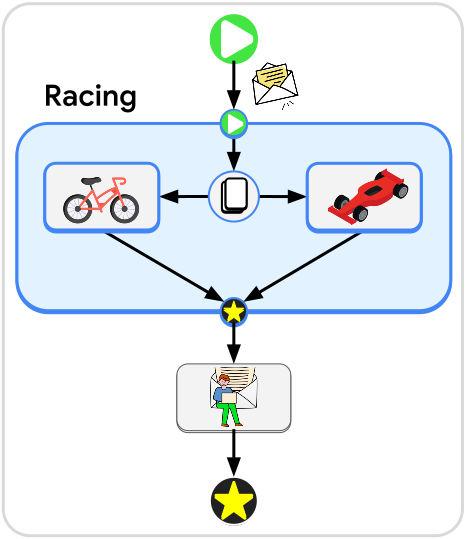
We can create a scope that copies the letter and then sends each copy to a different transporter: a bicycle and a race car.
If the letter only needs to be delivered a few blocks from the sender then the bicycle might get it to the destination faster, as the race car will lose time while looking for parking. On the other hand, if the destination is many miles away, the race car will easily overtake the bicycle and arrive first.
The service that finishes first will trigger the terminate operation of the scope, and the other service will be told to simply drop its task to avoid wasted effort.
Isolation
Another way to use scopes is to isolate sets of parallel activities. As demonstrated by the spread operation, it is possible for a branch or any set of elements in a workflow to have multiple simultaneous activations within one session. In some cases, it’s important to organize that activity into separate sessions to avoid cross-contamination of data.
For example, suppose we have a workflow that takes in a list of cloud resources along with what directory each resource should be saved to. We can use the spread operation to convert this list into an internal stream of messages so all the assets can be fetched in parallel.
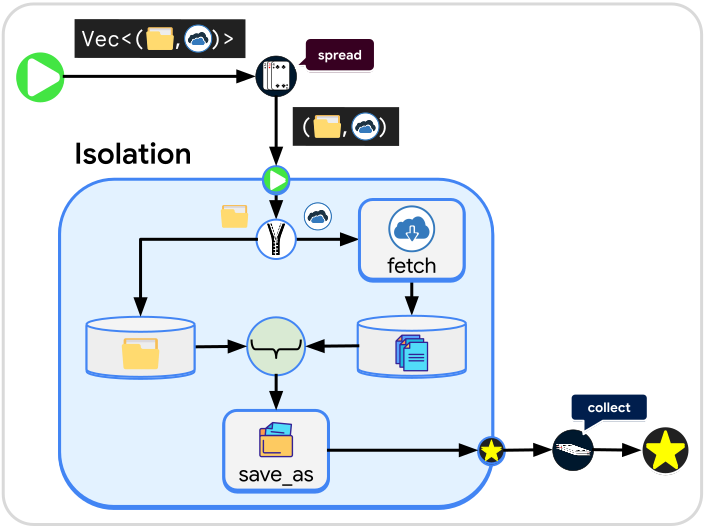
Suppose the service that fetches the cloud resource takes in only the URL and gives back the raw data received. We will need to unzip the directory information from the URL and save the directory information in a buffer while the resource is fetched. Without a scope operation we would be in a dangerous situation: What if the resources finish being fetched in a different order than the directory information is saved in its buffer? When we rejoin the directory information with the fetched data, we could end up sending files to the wrong directory.
Tip
Buffers inside the scope operation store their data separately per session of the scope.
By encapsulating the buffers, unzip, and join operations inside of a scope, we ensure that the fetched data gets sent to the correct directory no matter what order it arrives in. Each time a message starts a new session of the scope, the directory buffer will only contain the directory information from the message that started the session.
Outside of the scope, we will collect the final outputs of the scope operation to ensure that the workflow keeps running until all resources are fetched and saved.
Streams
The scope operation also supports output streams. In this case the stream out operation sends messages out to the parent scope.