Parallelism
Clone
Besides conditionally running one branch or another, some operations can run multiple branches in parallel. For example, the fork-clone operation takes in any cloneable message and then sends one copy down each each of the branches coming out of it:
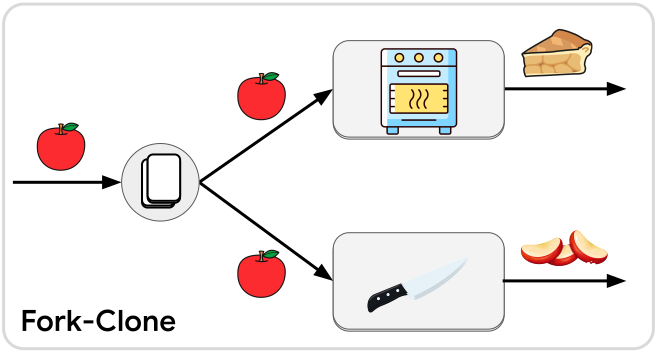
Each branch coming out of the fork-clone will run independently and in parallel. Unlike in a behavior tree, these branches are completely decoupled from here on out, unless you choose to synchronize them later. You are free to do any other kind of branching, cycling, connecting for each of these branches, without needing to consider what any of the other branches are doing.
Unzip
Another way to create parallel branches is to unzip a tuple message into its individual elements:
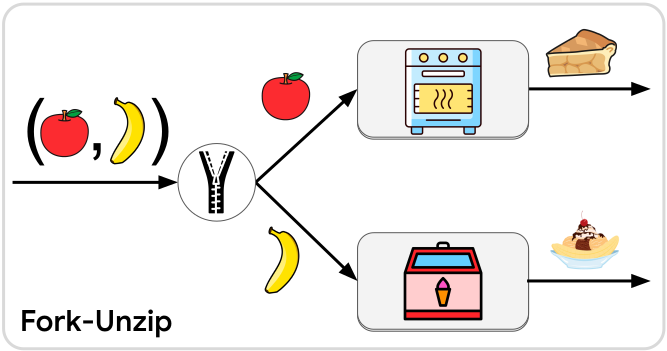
The tuple can have any number of elements (up to 12), and the fork-unzip will have as many output branches as its tuple had elements. Just like fork-clone, each branch will be fully independent.
Note
If you would like to unzip a regular struct with fields, where each field gets sent down a different branch, issue #145 is open to track this.
Spread
Warning
At the time of this writing, the spread operation is not yet available as a JSON diagram operation. This is being tracked by #59. In the meantime it can be put into a JSON diagram via the section builder operation.
Tip
A single node can be activated any number of times simultaneously.
Parallelism in workflows is not limited to forking into parallel branches. A single branch can support any amount of parallel activity. In other words, a single node can be activated multiple times simultaneously, with each run of its service being processed independently. One easy way to parallelize a single branch is with the spread operation:
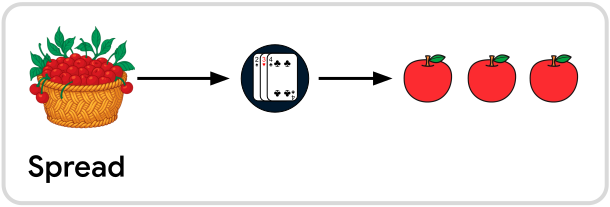
The spread operation takes an iterable message type (e.g. Vec,
array, or anything that implements IntoIterator) and spreads
it out into N separate messages where N is however many elements were in the
collection.
All of the messages coming out of the spread operation will be sent to the same input slot. In principle they are all sent to the input slot “at the same time” although the exact outcome will vary based on what kind of operation they are being sent to:
- If they are sent to a blocking service then they will be processed one-at-a-time but all of them will be processed within the same “flush” of the workflow (i.e. within one update frame of the Bevy schedule).
- If they are sent to an async service then the service will be activated with one message at a time, but the Futures of all the calls will be processed in parallel by the async compute task pool.
- If they are sent to a continuous service then they will all be queued up for the continuous service together, and the continuous service will see all of them in its queue the next time it gets run.
The inverse of the spread operation is the collect operation.
Split
One very useful operation can do conditional branching, parallel branching, and spreading all at once. That operation is called split:
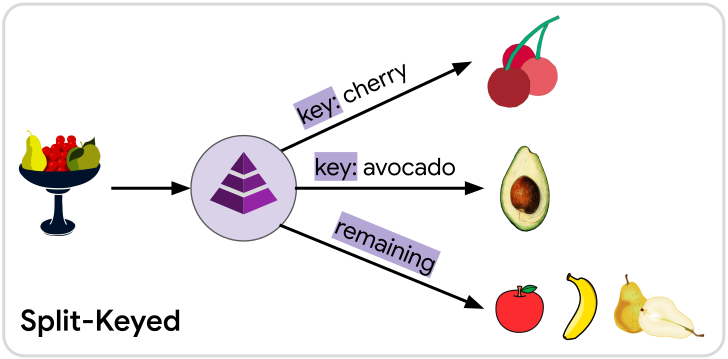
Split takes in anything splittable, such as collections and maps, and sends its elements down different branches depending on whether the element is associated with a certain key or location in a sequence:
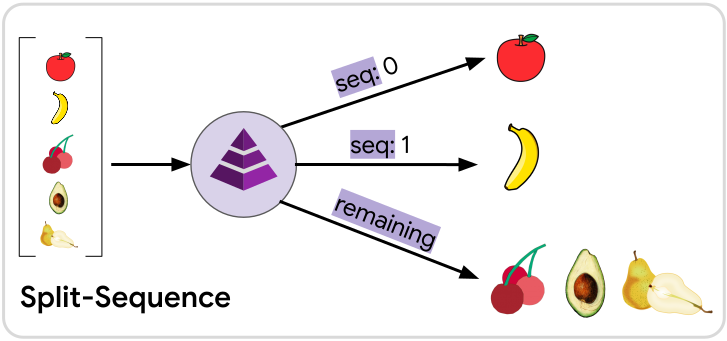
In a sequenced split, the first element in the collection will go down the seq: 0
branch, the second element will go down the seq: 1 branch, etc, and all the rest
will go down the remaining branch. The meaning of “first”, “second”, etc is
determined by how the splittable trait was implemented for the
input message. For vectors, arrays, etc this will naturally be the order that
the elements appear in the container. For ordered sets and maps (e.g.
BTreeSet and BTreeMap) it will be based on the sorted
order of the element or key, respectively. For unordered sets and maps (e.g.
HashSet and HashMap) the ordering will be arbitrary,
and may be different in each run, even if the input value of the message is the
same.
Tip
Keys and sequences can be used at the same time in one split operation. Elements will prefer to go down a branch that has a matching key, regardless of where the element would be in a sequence. If an element gets matched to a branch with a key, then that element will not count as part of the “sequence” at all, meaning the next element that doesn’t match any keyed branch will take its place in the sequence.
As a result, the branch for
seq: nwill never receive a message until all lower sequence branches up toseq: n-1have received a message first.
Any elements that don’t match one of the keyed or a sequenced branches will be
sent along the remaining branch. If multiple elements in the collection match
the same key or if multiple elements fail to match any keyed or sequenced branches,
then there will be multiple messages sent down the same branch, similar to the
spread operation.
The split operation also behaves similar to conditional branching because there
may be keyed or sequenced branches that have no matching element in the collection.
When this happens, no message will be sent down those unmatched branches. It is
also possible that all elements will be matched to a keyed or sequenced branch,
in which case no messages will be sent down the remaining branch.
Note
Splitting only works for data structures who can be split into a collection of messages that all share the same type. However serializing into a
JsonMessage, splitting it into elements ofJsonMessage, and then deserializing those messages later is one potential way to work around this.For splitting apart the fields of data structures without needing to serialize or deserialize, see issue #145.