Zenoh
Support for zenoh is implemented using
- The native Rust zenoh library
- prost-reflect for protobuf payloads
- serde_json for JSON payloads
Use the zenoh feature flag of crossflow to enable this support:
# Cargo.toml

[dependencies]
crossflow = { version = "*", features = ["diagram", "zenoh"] }
Enabling zenoh
Use registry.enable_zenoh(_) to register premade node builders that can build zenoh subscribers, publishers, and queriers:
use crossflow::prelude::*;

let mut registry = DiagramElementRegistry::new();
registry.enable_zenoh(Default::default());
enable_zenoh(_) takes in a zenoh config which you can feel free to customize.
Descriptor Pool
Just like for gRPC support, you will need to add your proto definitions to the global descriptor pool if you want to use protos as your payloads.
If the needed proto definitions are missing from the descriptor pool, a NodeBuildingError will be produced.
JSON payloads do not require any additional steps.
Configuration
Subscribers, publishers, and queriers each have separate node builders with different configuration types tailored to the specific information needed by each:
The mandatory fields include:
key — the key expression for the connection. Used by all three.
encoder — either "json" or { "protobuf": "_" } to indicate how to encode outgoing messages. Used by publishers and queriers.
decoder — either "json" or { "protobuf": "_" } to indicate how to decode incoming messages. Used by subscriptions and queriers.
Besides the mandatory fields, each config struct provides comprehensive coverage of the quality of service and other settings for each type of zenoh connection. Refer to the zenoh documentation for in-depth descriptions of the qualities of service.
Subscription
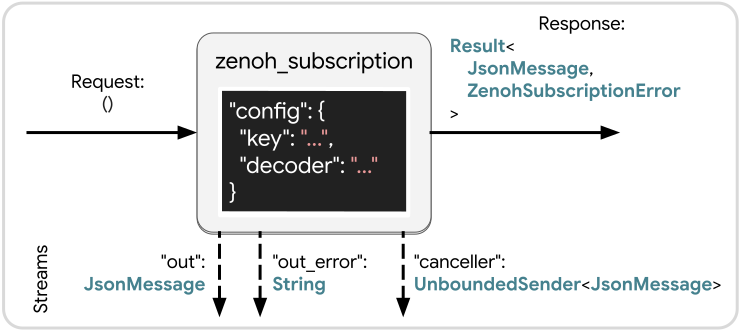
Subscriptions, provided by the "zenoh_subscription" node builder, allow your workflow to receive messages from anonymous publishers that publish to a key that’s compatible with the key expression of your subscription.
Once the node gets activated, it will stream out any incoming messages until it gets cancelled or until the scope it’s in finishes.
Request — A simple trigger that just prompts the node to begin listening for messages and streaming them out. If the node is already active, triggering it again will have no effect. If the node was previously active but cancelled, then triggering the node again will restart it.
“out” — Any messages received by the subscription will be sent out of the "out" stream.
“out_error” — If an error happens while decoding an incoming message, the error message will be streamed from "out_error".
The node will continue running as normal even if these errors occur, but each of these messages indicates an incoming message that failed to be decoded.
“canceller” — In case you want to cancel the subscription, you can capture this UnboundedSender, either storing it in a buffer or passing it to a node that can make a decision about when to cancel.
Triggering this will cause the final response of the node to be Ok(msg) where msg is whatever JsonMessage you pass into this sender.
Since subscriptions can last indefinitely, this is the only way to stop the node from running before the scope terminates.
Response — The final response of the node is a Result whose value is Ok if the subscription was cancelled using the "canceller", or Err if a ZenohSubscriptionError occurred.
Publisher
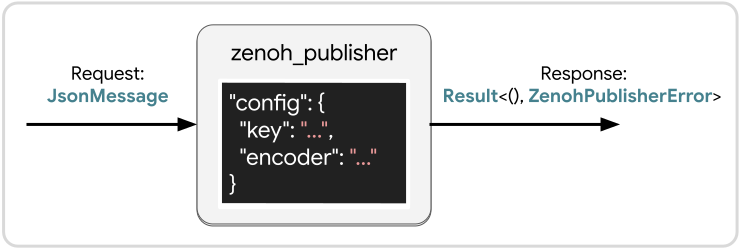
Publishers, provided by the "zenoh_publisher" node builder, allow your workflow to send messages to anonymous subscribers whose key expressions are compatible with the "key" that you configure for your node.
The zenoh publisher will be initialized and connect when the workflow is first built, and then every message sent to this node from any workflow session will be sent out over that same publisher. Note that this has some potential side-effects. If you configure the node to support late joiners then the late joiners will receive old messages even if the workflow session that sent those messages is no longer active.
Request — Pass in a JsonMessage to publish.
If your node is configured to use protobuf encoding, the node will return an error message if the input JsonMessage failed to serialize into the intended protobuf message.
Response — A Result which will be Ok if publishing the message was successful, or a ZenohPublisherError if a problem occurred.
Querier
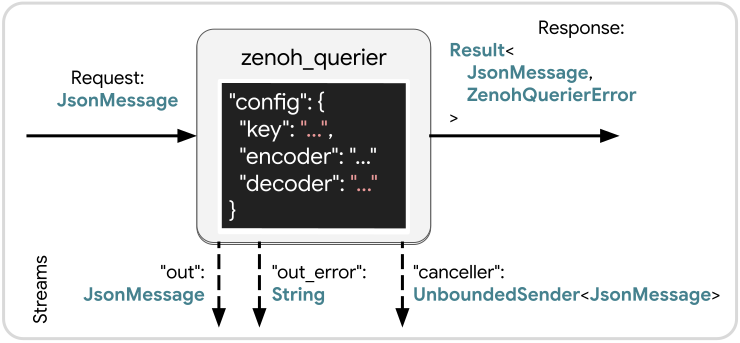
Queriers, provided by the "zenoh_querier" node builder, allow your workflow to send off a request message to a queryable, which is similar to a service.
The queryable will respond to the request message with some number of responses and then end the connection.
The layout of a querier node is the same as "zenoh_subscription" except
- The Request is a
JsonMessage. If a protobuf encoder was chosen, any failure to serialize the message into the intended protobuf type will have this node respond with anErr. - The response will return
Ok(null)when the query is finished. It will also returnOk(msg)if somemsgis sent to theUnboundedSenderprovided by"canceller". In the event of an error, it will return anErrcontainingZenohQuerierError.