Introduction to Workflows
If you need to assemble services in a more complex way than a series,
you can build a workflow. Building a workflow will ultimately leave you with a
Service which you can use to run the workflow.
Fundamentally, workflows define how the output of one service should connect to the input of another service. Along the way, the data that is being passed might undergo transformations.
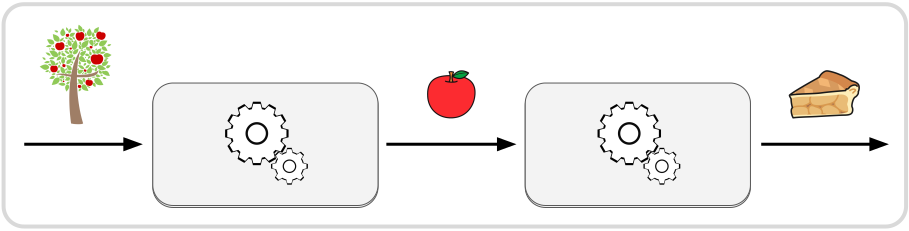
There are three strategies available for creating workflows, each with its own benefits and use-cases:
| Description | Benefits | |
|---|---|---|
 | Write Rust code to define nodes and workflows using the native Rust API of crossflow | 🠚 compile-time validation 🠚 access to all native features 🠚 easily import plugins |
 | Generate a JSON diagram based on the output of a planner or a description of some process | 🠚 runtime validation of diagram 🠚 visualize generated diagrams 🠚 implement highly dynamic systems |
 | Visually design and configure a workflow with a graphical editor | 🠚 no-code programming 🠚 validate diagram while editing 🠚 runtime validation of diagram |
This chapter will introduce concepts that are relevant to all three. For building workflows using the native Rust API, you can go to the How to Build a Workflow chapter. To learn about runtime generation and visual (no-code) editing of workflows, go to JSON Diagrams.
Tip
See our live web demo of the open source crossflow diagram editor.
Node
To put a service into a workflow you create a node by specifying a service that will be run when the node is given an input:
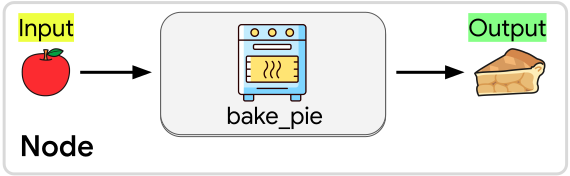
In this case we’ve created a node that will run the bake_pie service,
taking an apple and turning it into a pie. You can include the same service any
number of times in a workflow by creating a node for each place that you want to
run the service.
Input Slots and Outputs
A node has one input slot and one final output. There must be at least one output connected into a node’s input slot in order for the node to ever be activated, but there is no upper limit on how many outputs can connect to an input slot. The node will simply be activated any time a message is sent to its input slot, no matter what the origin of the message is.
The output of a node must be connected to no more than one input slot or operation. If an output is not connected to anything, we call that output “disposed”. If you want to connect your node’s output to multiple input slots, you will need to pass it through an operation like clone, unzip, or split depending on how you want the message’s data to be distributed.
To connect an output to an input slot, the data type of the output must match the data type expected by the input slot. When using the native Rust API, you can use a map node to transform an output message into a compatible input message. When building a JSON diagram, you can use the transform operation. A data type mismatch will either cause a compilation error (native Rust API) or a workflow building error (JSON Diagram). Either way, the workflow will not be allowed to run until the mismatch is resolved.
Streams
If the service used by your node has output streams then
you will receive a separate Output for each stream:
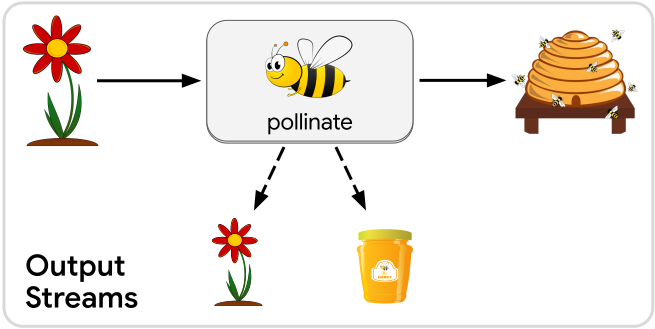
In this example, the pollinate service has a side effect of producing more
flowers and producing honey. We can represent these side effects as output streams
of the service.
Each of these streamed outputs can be connected to a separate input slot or operation. Each stream can carry a different data type, so make sure that you are connecting each stream to a compatible input slot or operation.
When building a workflow, streamed outputs behave essentially the same as the regular “final” output. There are just two practical characteristics that make streamed outputs different:
- Output streams will only produce messages while the node is active. After the final output message has been sent, no more stream messages can appear until the node is activated again by a new input message.
- For as long as the node is active, an output stream may produce any number of messages, including zero. This means you cannot rely on getting any messages from a stream unless you know something about the implementation of the service that the node is using.
Operations
Besides just running services, workflows need to manage the flow of data between those services. That includes conditional branching, parallelism, and synchronization. Continue to the next page to learn about the other kinds of operations that you can use in a workflow to achieve the behavior that you want.